Early Access · Android
🔥 Ember
Campfire restriction lookup for Washington State — wilderness, national forest, county, tribal, and park.
Get it right before you light.
About the app
Ember is an early Android build for Washington State outdoor enthusiasts. Get it right before you light. Before you light a fire — at a dispersed campsite, trailhead, or wilderness lake — Ember tells you the current restriction status for the exact location you're in.
Tap the map, search an address or campground, or use your GPS location. Ember cross-checks jurisdiction boundaries, current restriction orders, and permanent wilderness rules to give you a clear answer: allowed, restricted, prohibited, or verify first.
This project is just for fun, not profit, and proof that anyone can build an app.
What's new in v0.7.1
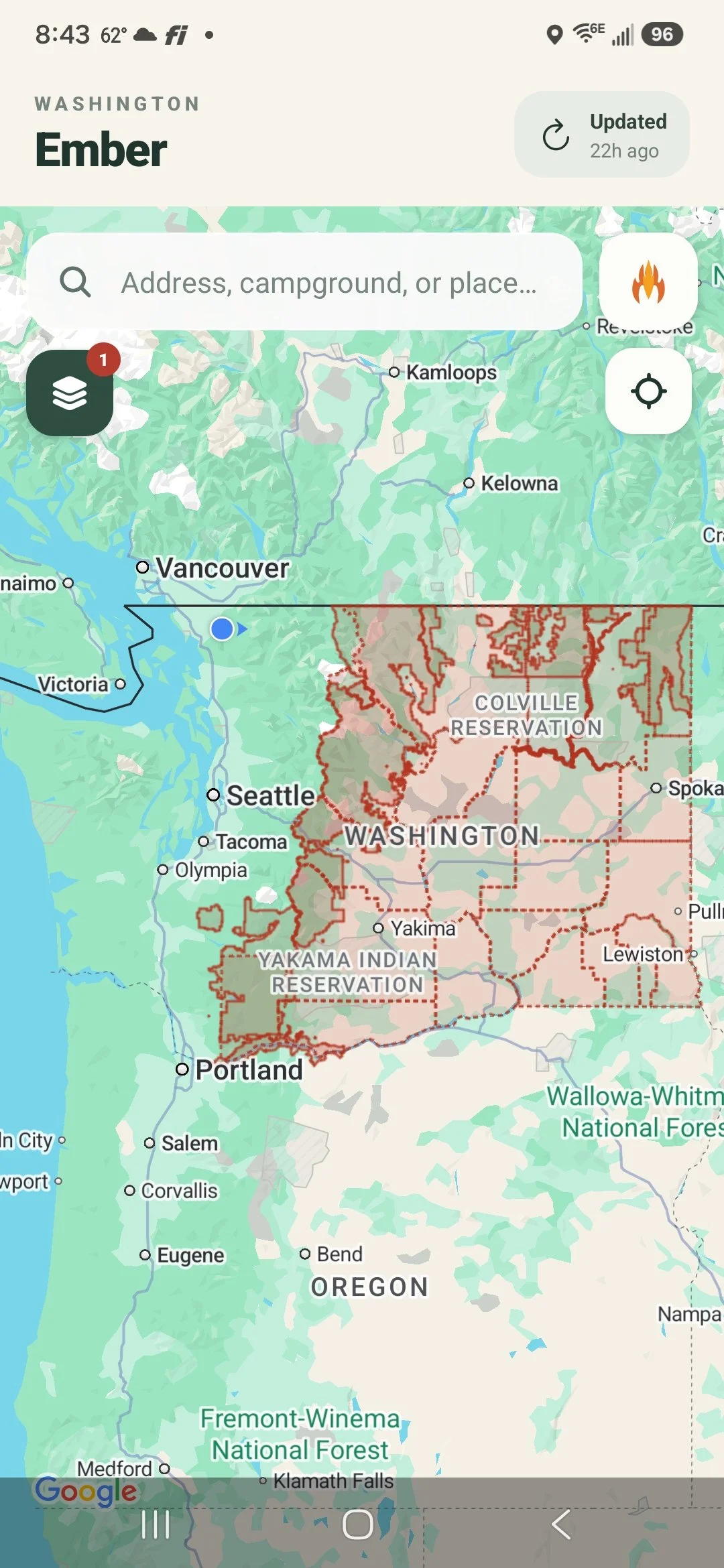
Refresh now actually refreshes
The in-app refresh button now pulls the latest burn-ban and Red Flag Warning data from the live feed. Previously it silently re-served whatever was bundled at build time — this build wires it up for real, so restriction data can now update between app releases.
Android APK — direct download, no Play Store needed. Requires Android 10 or later.
Download Ember v0.7.1Getting started
📲 Install steps
- On your Android phone, go to Settings → Apps → Special app access → Install unknown apps, find your browser or file manager, and enable "Allow from this source."
- Open the download link above on your phone and save the file.
- Tap the downloaded file and follow the install prompts.
Expected warnings during install
- "Install blocked" or "Unknown app" — because it's not from the Play Store. Tap Install anyway or More details → Install anyway.
- "Allow Ember to access your location?" — tap Allow. The app needs this to look up fire restrictions where you are.
- "Google Maps requires an API key" — if you see this, let me know. It means something went wrong on my end.
🧪 What to test
- Search for a place or address and check if the right fire restriction info comes up
- Tap the locate button (crosshair icon, upper-right under the campfire button) to check restrictions at your current GPS location
- Tap anywhere on the map to check a specific spot — try a point inside a lake buffer like Lake Dorothy or Rachel Lake and confirm the card says RESTRICTED with wood fire and charcoal showing as prohibited
- Try the layers button (upper-left) to see restriction zones overlaid on the map
- If the "Updated" chip is older than 4 hours, it should turn amber and prompt you to refresh
Known limitations
- Android only for now — no iOS build yet
- Coverage is Washington State only
- Data may not reflect the most current conditions, but generally stays current — a daily routine checks known authoritative sources for updates, and a weekly pass looks for new sources
Key features
Tap anywhere on the map
Instantly resolves the fire status for any point in Washington. Tap a trailhead, campground, or backcountry lake to check before you go.
Place search
Search by address, zip code, campground name, or trail. The map zooms to context-appropriate scale automatically.
Permanent wilderness rules
Altitude-based and lake-proximity fire bans in Alpine Lakes, Henry M. Jackson, William O. Douglas, Goat Rocks, and Tatoosh wildernesses — always shown even when no seasonal order is active.
Lake fire-free zones
Toggle an overlay showing ¼–½ mile no-campfire buffers around designated lakes across USFS districts and wildernesses.
Jurisdiction layers
County, national forest, ranger district, wilderness, and other boundary layers with fire stage color-coding.
Official source links
Every result links directly to the managing agency — USFS, DNR, NPS, BLM, or county — so you can verify against the latest posted order.
Release notes
Live data refresh
- Wired the live restriction feed URL into the release build — the refresh button now actually fetches current data instead of just re-serving the snapshot bundled at install time
Burn ban data fixes
- Kittitas County was showing RESTRICTED with wood fire and charcoal marked allowed, when the county's own page says no outdoor burning at all is permitted — corrected to PROHIBITED
- Whitman County was silently disappearing from the app whenever its source page changed in a way the parser couldn't confidently read — it now shows as "verify at official source" instead of vanishing
- Refreshed all restriction data feed-wide; several Red Flag Warnings and county burn-ban stages had gone stale since the last sync
Outdoor burning indicator
- The restriction card now shows a dedicated "Outdoor burning" indicator alongside wood fire, charcoal, and gas stove — it reads allowed only when there's no active restriction at all, since debris and land-clearing burning is typically banned before recreational campfires are
- Device indicator cells are now taller and narrower with word-wrapping labels, so four items fit the card without feeling crowded
County burn-ban data audit
- Reviewed the official source page tracked for every one of the 39 counties, and corrected it for 13 where it didn't reflect the county's real recurring or permanent burn rules (Grant, Douglas, Lewis, Skagit, Snohomish, Wahkiakum, King, Jefferson, Kitsap, Mason, Thurston, Skamania, and Yakima)
- Added source coverage for 4 counties that had none before (Columbia, Ferry, Garfield, Pacific)
- Fixed a broken source URL for Walla Walla (a domain typo meant it was never being checked) and a dead link for Douglas County
- Corrected Mason County specifically after a follow-up look — it now reads its real current-status page instead of a general regulations page, and correctly shows Stage 2 instead of a stale "no ban" reading
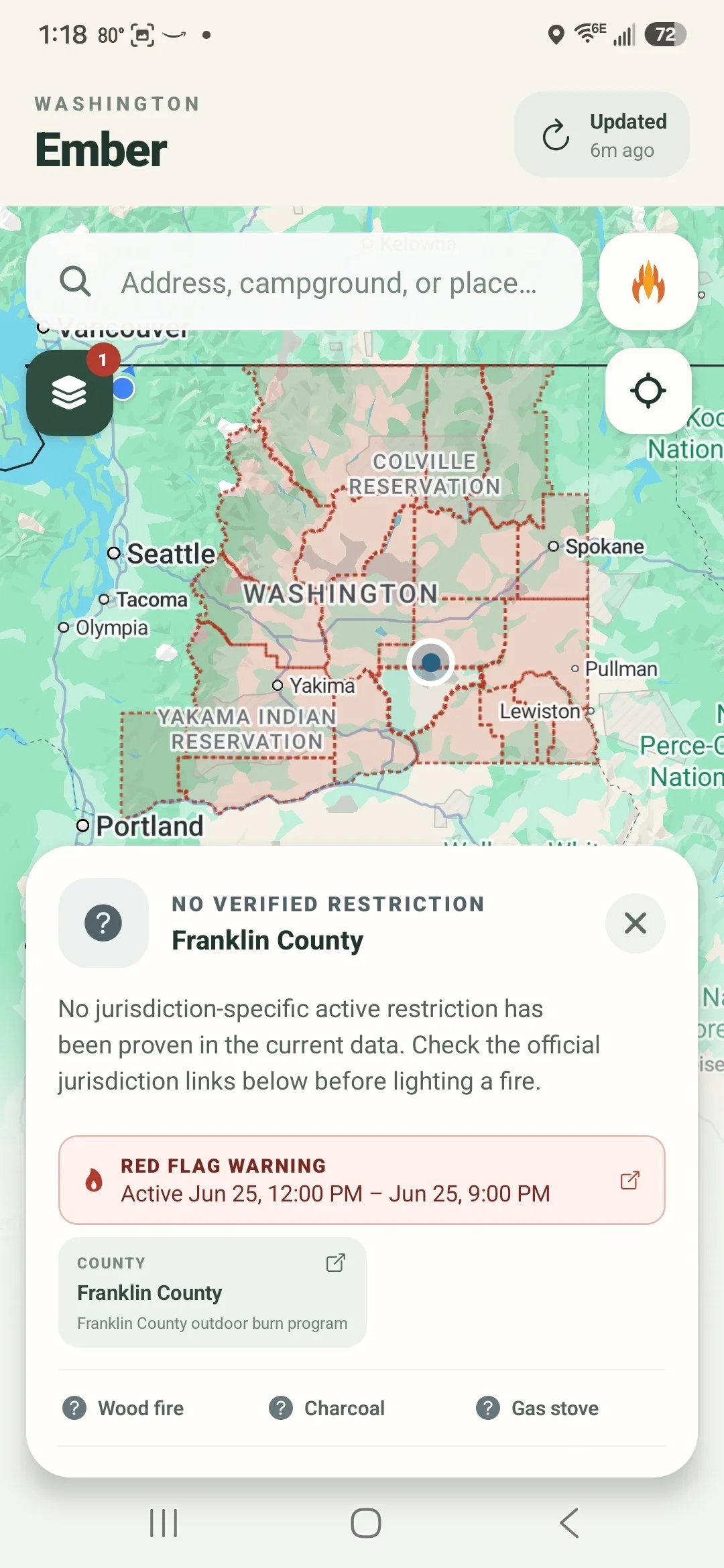
NWS Red Flag Warnings
Active Red Flag Warnings from the National Weather Service now appear directly in the restriction card and as a county overlay on the map — with a direct link to the issuing NWS office's warning text.
Red Flag Warnings
- Active NWS Red Flag Warnings now appear directly in the restriction card — a banner above the jurisdiction chips shows the active window (effective and expiration times) without needing to open the detail sheet
- Full warning detail is available in the expanded view, including a direct link to the issuing NWS office's Red Flag Warning text product
- New Red Flag Warnings layer in the layers panel overlays affected counties on the map in red
- Warning times now show the actual effective start and expiration of the weather event — not the time the alert was issued
County coverage
- All 39 Washington counties now have registered fire information sources and are checked daily for burn ban changes — previously only a handful were actively monitored
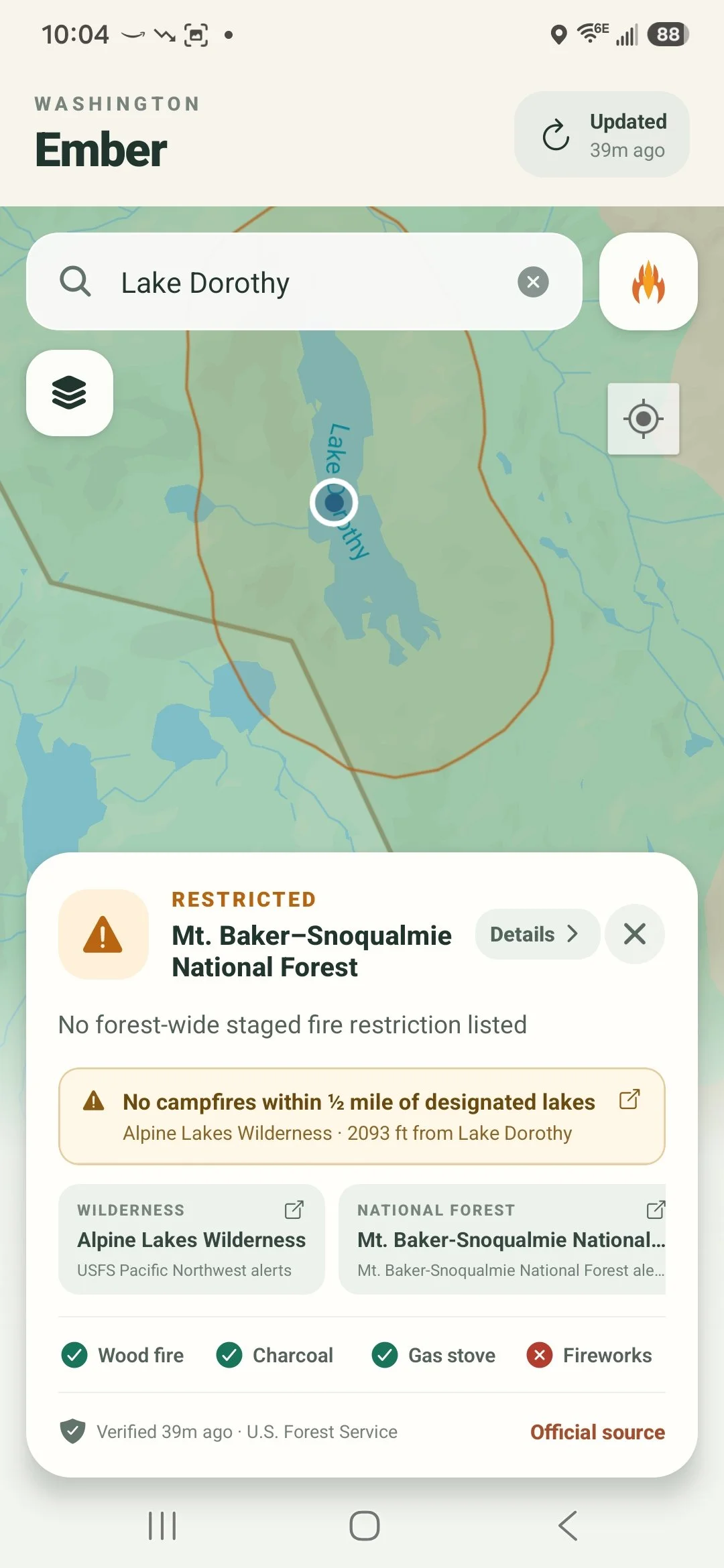
Lake proximity zones on the map
Tap inside a lake fire-free buffer and Ember surfaces the permanent no-campfire rule — even when there's no forest-wide order. The headline now correctly shows RESTRICTED, wood fire and charcoal badges flip to prohibited, and a note explains why.
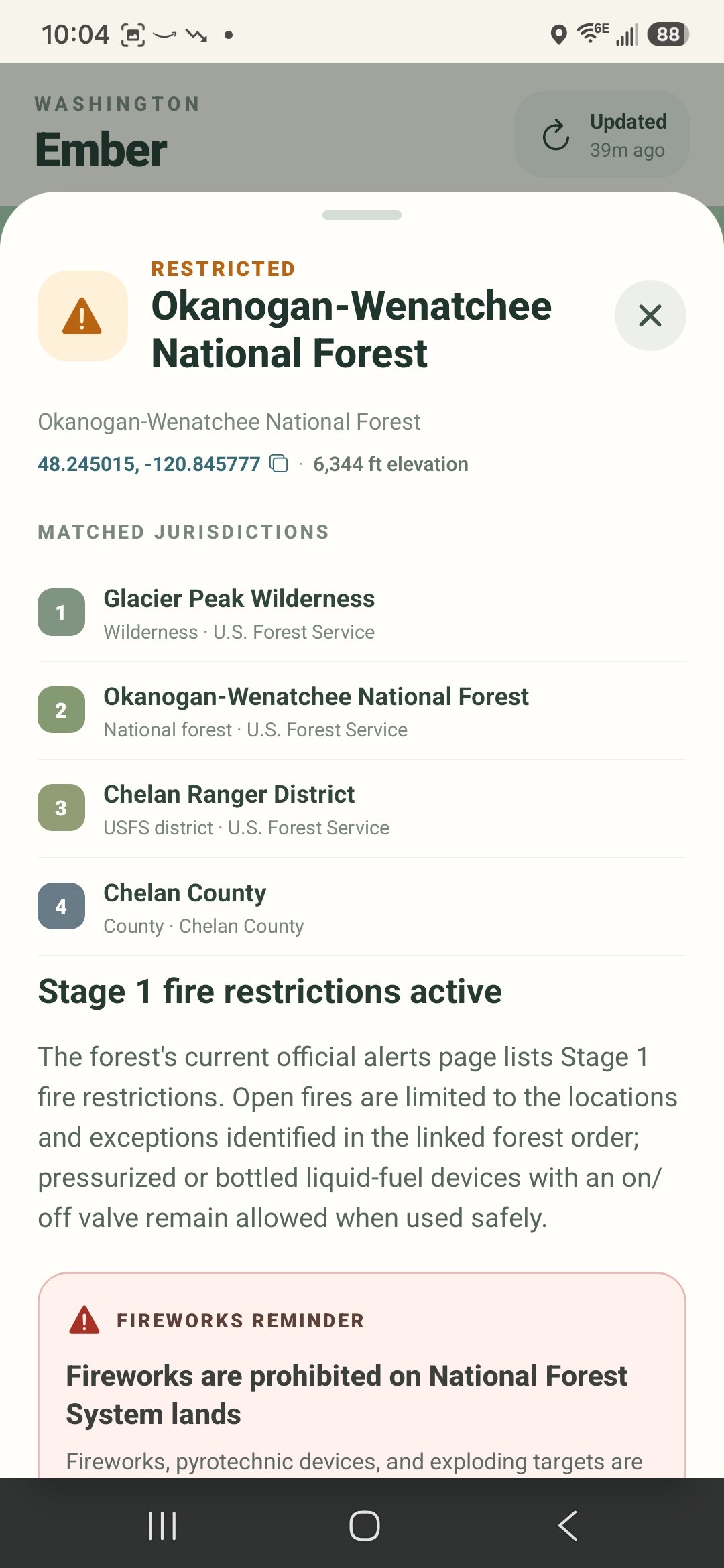
Federal restrictions take priority
Every matched jurisdiction is ranked in the detail sheet. Federal forest and wilderness restrictions now outrank county orders when picking the controlling result.
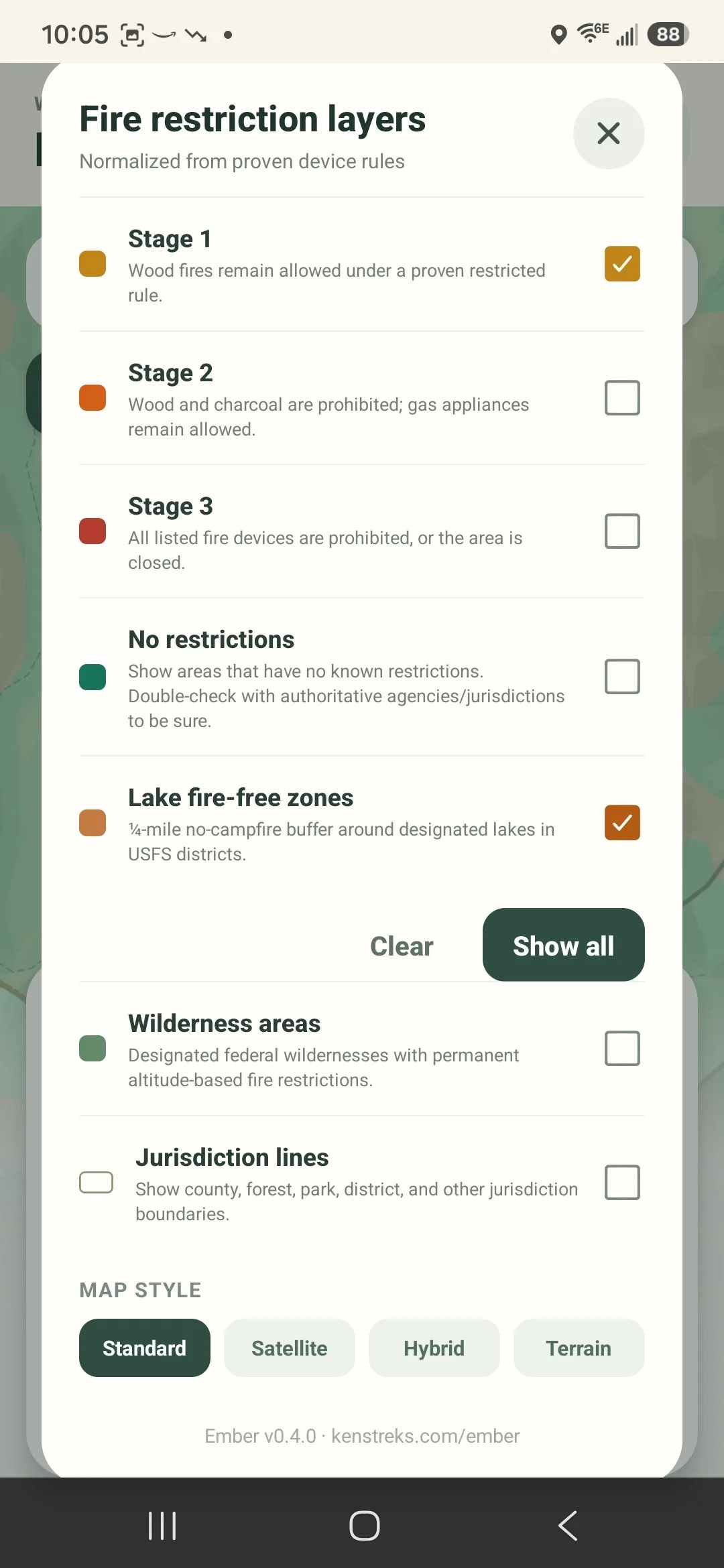
Cleaner layers panel
Fire restriction overlays are listed first. Map style controls are tucked at the bottom — easy to find, out of the way.
Restriction priority
- Federal and national forest restrictions now appear as the headline result when both a federal and a county or local restriction are active at the same location — previously, whichever was synced most recently could win
- Okanogan-Wenatchee National Forest Stage 1 restriction now correctly shows June 19 as its effective date
- Okanogan County burn restriction effective date corrected to June 15 (the official annual activation date); previously showed June 1
Data accuracy
- Effective date now shows "Now" when the exact start date isn't available from the source, rather than showing the time the data was synced — the real date fills in automatically on subsequent refreshes once it appears on the agency page
- App no longer replaces a newer bundled snapshot with an older API response on startup
Layers panel
- Map style selector (Standard / Satellite / Hybrid / Terrain) moved to the bottom of the layers panel under its own label — fire restriction overlays are now the first thing you see when you open it
Restriction card
- Card now lists all applicable restrictions beneath the main status row — secondary restrictions and active permanent rules are always visible without opening Details
- Place name now wraps to two lines at a smaller size so long jurisdiction names are never cut off
Wilderness rules
- Alpine Lakes Wilderness 5,000 ft altitude fire ban now correctly triggers when tapping high-elevation locations such as Dragontail Peak
- Fixed data pipeline that was silently discarding all wilderness permanent rules when authoritative boundary data was unavailable
UX
- GPS coordinates tap to copy to clipboard with a brief confirmation toast; a copy icon indicates the action
- Map tap animation now waits for the result card to settle before zooming, preventing the animation from being interrupted
Map and navigation
- Map selections now zoom reliably after the location result card opens
- Jurisdiction boundary lines are off by default for a cleaner map and can be enabled at the bottom of the layers panel
- Map labels and restriction overlays remain available without covering the map in status pins
Location details
- The full restriction detail sheet now scrolls correctly on Android
- Added selectable GPS coordinates that open the selected point in Google Maps
- Added elevation lookup for map taps, place searches, restriction results, and current GPS location
- Replaced the ambiguous information icon with a clearly labeled Details button
Data quality
- Removed demonstration jurisdictions and demonstration restriction records from production results
- Collapsed duplicate county, wilderness, forest, and district entries while preserving all underlying polygons for accurate restriction matching
- Changed production matching to favor jurisdiction-specific proven restrictions and avoid false-positive inherited warnings
Reliability
- Fixed Expo Go startup initialization errors affecting FormData, WebSocket, and timers on Android
- Improved Android detail-card touch handling so scrolling no longer conflicts with tap-to-dismiss behavior
New
- Added Trap Lake to Alpine Lakes Wilderness lake fire-free zone (southwest of Hope Lake, confirmed via OpenStreetMap)
- Version number now displayed in the app's layers panel
Fixes
- Removed incorrectly placed Deep Lake proximity circle that appeared near Falls Creek Trail / Ingalls Creek
- Search results now zoom to context-appropriate scale — a city zooms out; a campground or trail zooms in
- Fixed Heather Lake identity in Henry M. Jackson Wilderness rule (Chelan County lake, not the Verlot/Snohomish County lake)
- Corrected coordinates for all Stevens Pass / US-2 corridor lakes — Hope, Mig, Josephine, Swimming Deer, Susan Jane, and others were 15–25 km off
Performance
- Boundary polygons cached on load — eliminates per-frame geometry recalculation
- Viewport culling prevents off-screen polygons from rendering
- Lake proximity circles only compute when the lake overlay is enabled
- Interactive map for all of Washington State with tap-to-check fire restriction status
- Place search with Google Maps autocomplete
- Jurisdiction boundary overlays: county, national forest, ranger district, wilderness, state park, BLM, DNR, tribal
- Fire stage layers (Stage 1–3) with color-coded map overlay and legend
- Permanent wilderness fire rules: Alpine Lakes, Henry M. Jackson, William O. Douglas, Goat Rocks, Tatoosh, Mt. Baker Sensitive Lakes
- Lake fire-free zone overlay for Cle Elum RD, Alpine Lakes Wilderness, HMJ Wilderness, and others
- Altitude-based fire ban detection using GPS elevation
- Fireworks reminders with jurisdiction-specific details
- Official source links for every jurisdiction
- GPS "use my location" with automatic jurisdiction and elevation lookup